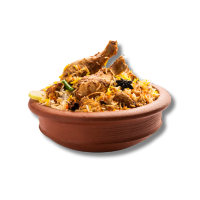
No commission. Just biryani, directly to your customer.
It’s Tuesday afternoon. Someone in your area is craving biryani. They open WhatsApp, message a friend, and ask – “yaar koi achha biryani centre ka number hai?” Their friend sends your number. The customer messages you: “Bhai, 2 plates chicken biryani milegi? Home delivery hogi kya?”

That moment – that WhatsApp message – is worth money. But are you ready to receive it? Do you have a menu they can see? Do they know your prices, your timings, your minimum order? Or does the conversation die because it’s too much back-and-forth?
chotu fixes this. It turns your WhatsApp into a proper ordering system – for free.
Why WhatsApp Is Already Your Best Sales Channel
If you run a biryani centre, you’re probably already getting some orders on WhatsApp. A regular customer messages you. You reply. You take the order. It works – but it’s messy.
The problem isn’t WhatsApp. The problem is there’s no menu attached to your number. Every new customer has to ask: “What do you have? What’s the price? Do you deliver? What’s the minimum?” You answer the same questions 10 times a day.
With chotu, you share one link – and that link answers everything before the customer even messages you.
What Happens When You Have a chotu Catalog
Imagine this instead:
A customer searches for biryani near them, finds your chotu link (shared in a local WhatsApp group or listed on google in chotu page), and clicks it. They see:
- Your full menu – Chicken Biryani, Mutton Biryani, Egg Biryani, Family Pack, Half Plate
- Prices clearly listed
- Your timing – 11 AM to 10 PM
- Delivery area and minimum order
- A single “Order on WhatsApp” button
They tap the button. WhatsApp opens with a pre-filled message: “Hi, I’d like to place an order.” You receive it, confirm, and it’s done. Clean. Fast. Professional.
No confusion. No repeated questions. No lost orders.
Step-by-Step: Set Up Your Biryani Centre on chotu
Step 1: Visit owner.chotu.com
Go to owner.chotu.com or select from below list from your phone. Registration is free and fast.
Step 2: Register your center
Enter your biryani center’s name, location, and WhatsApp number. Select Biryani Centre as your category.
Step 3: Build your menu
Add every item you sell with its price. Be thorough:
- Chicken Biryani (Full) – ₹180
- Chicken Biryani (Half) – ₹100
- Mutton Biryani (Full) – ₹220
- Egg Biryani – ₹120
- Family Pack (4 persons) – ₹600
- Raita – ₹30
- Cold Drink – ₹40
The more complete your menu, the fewer questions customers ask before ordering.
Step 4: Add your timings and delivery info
Let customers know when you’re open and whether you deliver, your delivery area, and minimum order amount. This alone eliminates at least half the back-and-forth messages you currently get.
Step 5: Get your shareable link
chotu gives you a unique link for your catalog. This is your digital menu – shareable anywhere.
Where to Share Your chotu Link for Maximum Orders
Once your catalog is live, the link works hardest when you put it in the right places:
WhatsApp Status – Update your status daily. “Today’s special: Mutton Biryani ₹220 🍛 Order here: https://chotu.com/biz/1234567890 ” Every contact sees it.
Local WhatsApp Groups – Apartment groups, colony groups, office groups nearby. Share your link with a simple message: “Fresh biryani daily, home delivery available – check our menu here.”
Your own WhatsApp Business profile – Add the chotu link in your business description so every customer who opens your profile sees it immediately.
Google Business Profile – If you have one, add the link in your website field. It helps you appear in “biryani near me” searches.
Printed on your packaging – Add the link or a QR code to your parcel bags and boxes. Every delivery creates a new potential repeat customer.
The Real Business Impact
WhatsApp ordering through a digital catalog isn’t just convenient – it changes how your business runs:
Faster order taking – customers browse and decide before messaging. You spend less time explaining and more time cooking.
Fewer errors – when customers see the menu and pick items themselves, wrong orders drop significantly.
More repeat orders – a customer who has your link saved will reorder directly. No searching, no asking around.
Word of mouth goes digital – when a happy customer forwards your link to a friend, that friend gets your full menu instantly. The old “give him a call” now becomes “here’s their menu, just tap to order.”
What About Swiggy and Zomato?
Many biryani centre owners wonder if they should just list on Swiggy or Zomato. You can – but here’s what those platforms take: 20% to 30% commission on every order. On a ₹180 plate, that’s ₹36 to ₹54 gone before you’ve paid for gas.
chotu is different. Your chotu catalog drives orders directly to your WhatsApp. You keep 100% of every sale. No commission, no platform dependency, no risk of getting delisted.
Use both if you want – but build your own direct ordering channel first with chotu, so you’re never fully dependent on anyone else.
One Last Thing
The biryani business in India runs on loyalty. Once a customer loves your biryani, they come back again and again. But first – they have to find you. They have to be able to order easily. They have to trust that you’re a proper, reliable setup.
A digital catalog on chotu signals all of that. It tells a new customer: this is a serious business, here’s the menu, here’s the price, tap to order.